


[Administrative note: This month's Pandas office hours will take place on Sunday, September 29th, at 7:15 p.m. in Israel. I'll send full info, including a link to the Zoom session, tomorrow. Come and ask any Pandas-related questions you have!]
Elections are about choosing a country's leaders, and in that sense, US elections – including those happening in November – are just like many others. But elections in the US also involve a great deal of money, with funds raised by candidates, parties, and political action committees (PACs). These actors report their fund-raising to the Federal Elections Commission (FEC, https://en.wikipedia.org/wiki/Federal_Election_Commission or https://fec.gov) which then reports this information to the public. The theory, at least, is that making fund-raising information public will make it harder for wealthy individuals and groups to affect elections. (In practice? I'm far from convinced.)
This week, we're looking at fund-raising information from political parties and PACs, reading the data into Pandas and then querying it. Except that this week's challenge didn't involve us querying the data. Rather, I asked you to build a dashboard with Streamlit (https://streamlit.io/) that enabled end users to query the data.
Streamlit is an open-source project, purchased several years ago by data company Snowflake (https://www.snowflake.com/en/). Using Streamlit, you don't have to write HTML, JavaScript, or CSS; you write Python code, using their methods, and then deploy the application to a server of your choice – including Streamlit's own cloud service.
Data and six questions
This week, I asked you to create a Streamlit app based on the public data released from the FEC via its "bulk data download page":
https://www.fec.gov/data/browse-data/?tab=bulk-data
On that page, scroll down to "PAC summary," and click on the + sign to its right. That'll open up a number of links, each for a different two-year election season. Click on the link for 2023-2024, or use this link:
https://www.fec.gov/files/bulk-downloads/2024/webk24.zip
That should download a zipfile for PAC data. When it is unzipped, it'll contain a single text file, webk24.txt, with the PAC data.
A data dictionary, and a list of the column names and descriptions, is at
https://www.fec.gov/campaign-finance-data/pac-and-party-summary-file-description/
Here are my six tasks and questions. I normally provide you with the Jupyter notebook that I used to solve problems; this week, I'll provide you with a zipfile containing not only my notebook, but also the Streamlit apps that I created to solve problems 2-5:
From the data in webk24.txt, as well as the data dictionary for this data, create a data frame. The index should be the committee ID (CMTE_ID), and the column names should be taken from the data dictionary.
For starters, I loaded up Pandas:
import pandas as pd
Then I wanted to load up the zipfile that I had downloaded, webk24.zip. I could have used unzip to open the file, and then work with the compressed file inside of it, webk24.txt. But if you had read_csv a file with a .zip extension, Pandas is smart enough to unzip it and then read it into a data frame. That's what I thus decided to do:
df = pd.read_csv(filename)
However, this didn't work: I got a ParserError exception, telling me that the parser expected to have 2 fields, but saw 3. At first glance, this might indicate that the file is damaged in some way. But upon opening (yes, unzipping) it and looking at the file, I saw that it was a CSV file in the sense of "character separated values," but definitely not the default of "comma separated values." The separator character here was the vertical bar (|), which we can indicate to read_csv by passing the sep keyword argument:
df = pd.read_csv(filename,
                 sep='|'
                )
The good news? This works, giving us a data frame. However, the file lacks a header line, which means that the first set row of data is being treated as the header names. We'll fix this by adding two keyword arguments: First, we'll say that there are no header names (by specifying header=None). Second, we'll pass a list of strings to the names keyword argument, giving the columns names.
Where will I get those names from? The data dictionary at https://www.fec.gov/campaign-finance-data/pac-and-party-summary-file-description/. It was a bit annoying for me to copy, paste, and edit those names into a list of strings, but I managed to do it. I then got the following:
df = pd.read_csv(filename,
                 sep='|',
                header=None,
                names= ['CMTE_ID', 'CMTE_NM', 'CMTE_TP',
                        'CMTE_DSGN', 'CMTE_FILING_FREQ',
                        'TTL_RECEIPTS', 'TRANS_FROM_AFF',
                        'INDV_CONTRIB', 'OTHER_POL_CMTE_CONTRIB',
                        'CAND_CONTRIB', 'CAND_LOANS', 'TTL_LOANS_RECEIVED',
                        'TTL_DISB', 'TRANF_TO_AFF', 'INDV_REFUNDS',
                        'OTHER_POL_CMTE_REFUNDS', 'CAND_LOAN_REPAY',
                        'LOAN_REPAY', 'COH_BOP', 'COH_COP',
                        'DEBTS_OWED_BY', 'NONFED_TRANS_RECEIVED',
                        'CONTRIB_TO_OTHER_CMTE', 'IND_EXP',
                        'PTY_COORD_EXP', 'NONFED_SHARE_EXP', 'CVG_END_DT'])
This actually worked just fine, almost giving us the data frame that I requested. The only thing that's missing at this point is the data frame's index, which I asked would be from the committee ID – the first column in the data frame, aka column CMTE_ID. I passed the index_col keyword argument, using the name that we provided in the names keyword argument:
df = pd.read_csv(filename,
                 sep='|',
                header=None,
                names= ['CMTE_ID', 'CMTE_NM', 'CMTE_TP',
                        'CMTE_DSGN', 'CMTE_FILING_FREQ',
                        'TTL_RECEIPTS', 'TRANS_FROM_AFF',
                        'INDV_CONTRIB', 'OTHER_POL_CMTE_CONTRIB',
                        'CAND_CONTRIB', 'CAND_LOANS', 'TTL_LOANS_RECEIVED',
                        'TTL_DISB', 'TRANF_TO_AFF', 'INDV_REFUNDS',
                        'OTHER_POL_CMTE_REFUNDS', 'CAND_LOAN_REPAY',
                        'LOAN_REPAY', 'COH_BOP', 'COH_COP',
                        'DEBTS_OWED_BY', 'NONFED_TRANS_RECEIVED',
                        'CONTRIB_TO_OTHER_CMTE', 'IND_EXP',
                        'PTY_COORD_EXP', 'NONFED_SHARE_EXP', 'CVG_END_DT'],
                index_col='CMTE_ID')
This resulted in a data frame with 11,916 rows and 26 columns. Success!
Create a Streamlit app that displays this data frame, in its entirety. Have a title (e.g., "PAC fund-raising explorer") at the top of the page.
Next, I asked you to create a Streamlit application that displays the entire data frame. You write a Streamlit app as a Python program, with a .py extension. (You have to install Streamlit first, with pip install streamlit on the command line.)
What's remarkable about Streamlit, at least for someone like me who has been doing Web development since 1993, is the lack of HTML, JavaScript, CSS, or anything else on the front end. You write your program using Python, Pandas, and Streamlist objects; when the app runs, the appropriate back-end and front-end code is run, resulting in a Web app.
The first thing that any Streamlit app needs to do is load the streamlit module. The first two lines of my app are thus going to be:
import streamlit as st
import pandas as pd
Next, I included the code that we reviewed in question 1, loading the data from the FEC's CSV file into a data frame:
filename = '/Users/reuven/Downloads/webk24.txt'
df = pd.read_csv(filename, sep='|',
                 header=None,
                 names= ['CMTE_ID',
                         'CMTE_NM', 'CMTE_TP', 'CMTE_DSGN',
                         'CMTE_FILING_FREQ', 'TTL_RECEIPTS', 'TRANS_FROM_AFF',
                         'INDV_CONTRIB', 'OTHER_POL_CMTE_CONTRIB',
                         'CAND_CONTRIB', 'CAND_LOANS', 'TTL_LOANS_RECEIVED',
                         'TTL_DISB', 'TRANF_TO_AFF', 'INDV_REFUNDS',
                         'OTHER_POL_CMTE_REFUNDS', 'CAND_LOAN_REPAY',
                         'LOAN_REPAY', 'COH_BOP', 'COH_COP', 'DEBTS_OWED_BY',
                         'NONFED_TRANS_RECEIVED', 'CONTRIB_TO_OTHER_CMTE',
                         'IND_EXP', 'PTY_COORD_EXP', 'NONFED_SHARE_EXP',
                         'CVG_END_DT'],
                 index_col='CMTE_ID')
Finally, I invoked two Streamlit methods. The first, st.title, displays a title at the top of the Web page. The second, st.dataframe, takes a Pandas data frame as an argument, and displays it on the screen.
The entirety of my app now looks like this:
import streamlit as st
import pandas as pd

filename = '/Users/reuven/Downloads/webk24.txt'
df = pd.read_csv(filename, sep='|',
                 header=None,
                 names= ['CMTE_ID',
                         'CMTE_NM', 'CMTE_TP', 'CMTE_DSGN',
                         'CMTE_FILING_FREQ', 'TTL_RECEIPTS', 'TRANS_FROM_AFF',
                         'INDV_CONTRIB', 'OTHER_POL_CMTE_CONTRIB',
                         'CAND_CONTRIB', 'CAND_LOANS', 'TTL_LOANS_RECEIVED',
                         'TTL_DISB', 'TRANF_TO_AFF', 'INDV_REFUNDS',
                         'OTHER_POL_CMTE_REFUNDS', 'CAND_LOAN_REPAY',
                         'LOAN_REPAY', 'COH_BOP', 'COH_COP', 'DEBTS_OWED_BY',
                         'NONFED_TRANS_RECEIVED', 'CONTRIB_TO_OTHER_CMTE',
                         'IND_EXP', 'PTY_COORD_EXP', 'NONFED_SHARE_EXP',
                         'CVG_END_DT'],
                 index_col='CMTE_ID')

st.title('PAC fund-raising explorer')
st.dataframe(df)
With this stored in the file bw85-q2.py, I then go to the command line and type:
streamlit run bw85-q2.pyThe first time you run a Streamlit app, it'll ask you to enter your e-mail address to get updates on the project. Following that, it will display a message telling you how to access your application. On my computer, it wrote:
  You can now view your Streamlit app in your browser.

  Local URL: http://localhost:8501
  Network URL: http://192.168.1.166:8501
I went to that URL, and saw the following in my browser:
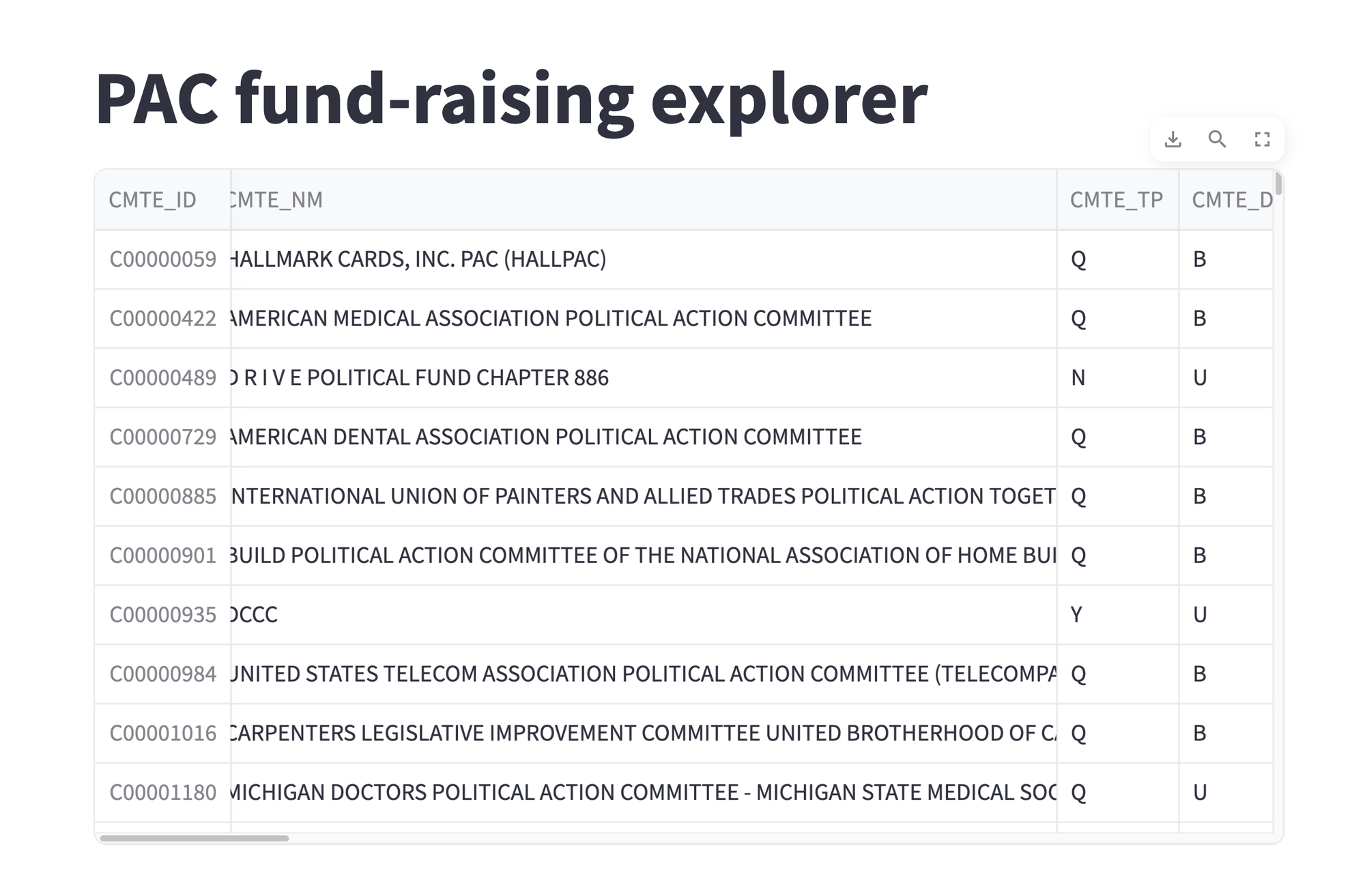
This shows our data frame, displayed in a browser. The three buttons at the top right of the data frame provide some interactive functionality:
- You can download the data frame as a CSV file
- You can search through the data frame for matching strings
- You can expand the data frame to fill the entire screen
Not bad, for adding a handful of lines of code to our application, right?
Add a text field allowing the user to filter the names of the PACs displayed. If the user enters AB, then any PAC whose name (CMTE_NM) contains AB should be displayed. The match should be case-insensitive. Ignore records in which the committee name is NaN. Tell the user how many rows match the user's criteria.
Next, I asked you to add a widget to the dashboard – a text widget, in this place – allowing the user to narrow the list of output rows, by searching through the values in CMTE_NM.
To get a text-input widget, we use st.text_input. Like most widgets in Streamlit, invoking this method returns an object that we can assign to a variable. The variable then contains the value that we received from the input.
Consider this for a moment: We're writing in Python, in what's ostensibly a back-end program. But we're able to display a text field in the user's browser, get whatever input the user gave to us in our Python program, and then use it to filter through the results:
committee_name_contains = st.text_input(
    'Committee name contains')
Once we have the user's input, we can use it to filter through our data frame. Actually, we have to filter in two ways:
- First, we need to remove any rows in which
CMTE_NMisNaN. (Why would it beNaN? I can't figure that out, either.) - Second, we need to keep only those rows in which
CMTE_NMcontains the user's input. Note that all of the names in the original data set are IN ALL CAPS.
I did this first by invoking dropna on our data frame, invoking the subset keyword argument to only look at CMTE_NM when looking for NaN:
filtered_df = (
    df
    .dropna(subset=['CMTE_NM'])
    )
Next, I used .loc along with lambda to find those rows in which CMTE_NM contains the user's input. I used str.contains on the series, passing it not the user's input, but the result of invoking str.upper on the user's input:
filtered_df = (
    df
    .dropna(subset=['CMTE_NM'])
    .loc[lambda df_:
         df_['CMTE_NM'].str.contains(committee_name_contains.upper())]
    )
The result, filtered_df, is a data frame fulfilling our requirements.
I added, after the display of the data frame, the number of rows in the data frame, using st.write to display text. Inside of my f-string, I added a call to len(filtered_df.index), which is the fastest way to get the number of rows in a data frame:
st.write(f'Total rows: {len(filtered_df.index)}')
My total program was thus:
import streamlit as st
import pandas as pd

filename = '/Users/reuven/Downloads/webk24.txt'

df = pd.read_csv(filename, sep='|',
                 header=None,
                 names= ['CMTE_ID',
                         'CMTE_NM', 'CMTE_TP', 'CMTE_DSGN',
                         'CMTE_FILING_FREQ', 'TTL_RECEIPTS', 'TRANS_FROM_AFF',
                         'INDV_CONTRIB', 'OTHER_POL_CMTE_CONTRIB',
                         'CAND_CONTRIB', 'CAND_LOANS', 'TTL_LOANS_RECEIVED',
                         'TTL_DISB', 'TRANF_TO_AFF', 'INDV_REFUNDS',
                         'OTHER_POL_CMTE_REFUNDS', 'CAND_LOAN_REPAY',
                         'LOAN_REPAY', 'COH_BOP', 'COH_COP', 'DEBTS_OWED_BY',
                         'NONFED_TRANS_RECEIVED', 'CONTRIB_TO_OTHER_CMTE',
                         'IND_EXP', 'PTY_COORD_EXP', 'NONFED_SHARE_EXP',
                         'CVG_END_DT'],
                 index_col='CMTE_ID')

# Committee name contains
committee_name_contains = st.text_input(
    'Committee name contains')

filtered_df = (
    df
    .dropna(subset=['CMTE_NM'])
    .loc[lambda df_:
         df_['CMTE_NM'].str.contains(committee_name_contains.upper())]
    )

st.title('PAC fund-raising explorer')
st.dataframe(filtered_df)
st.write(f'Total rows: {len(filtered_df.index)}')
I ran the program:
streamlit run bw85-q3.pyAnd got the following application in my browser:
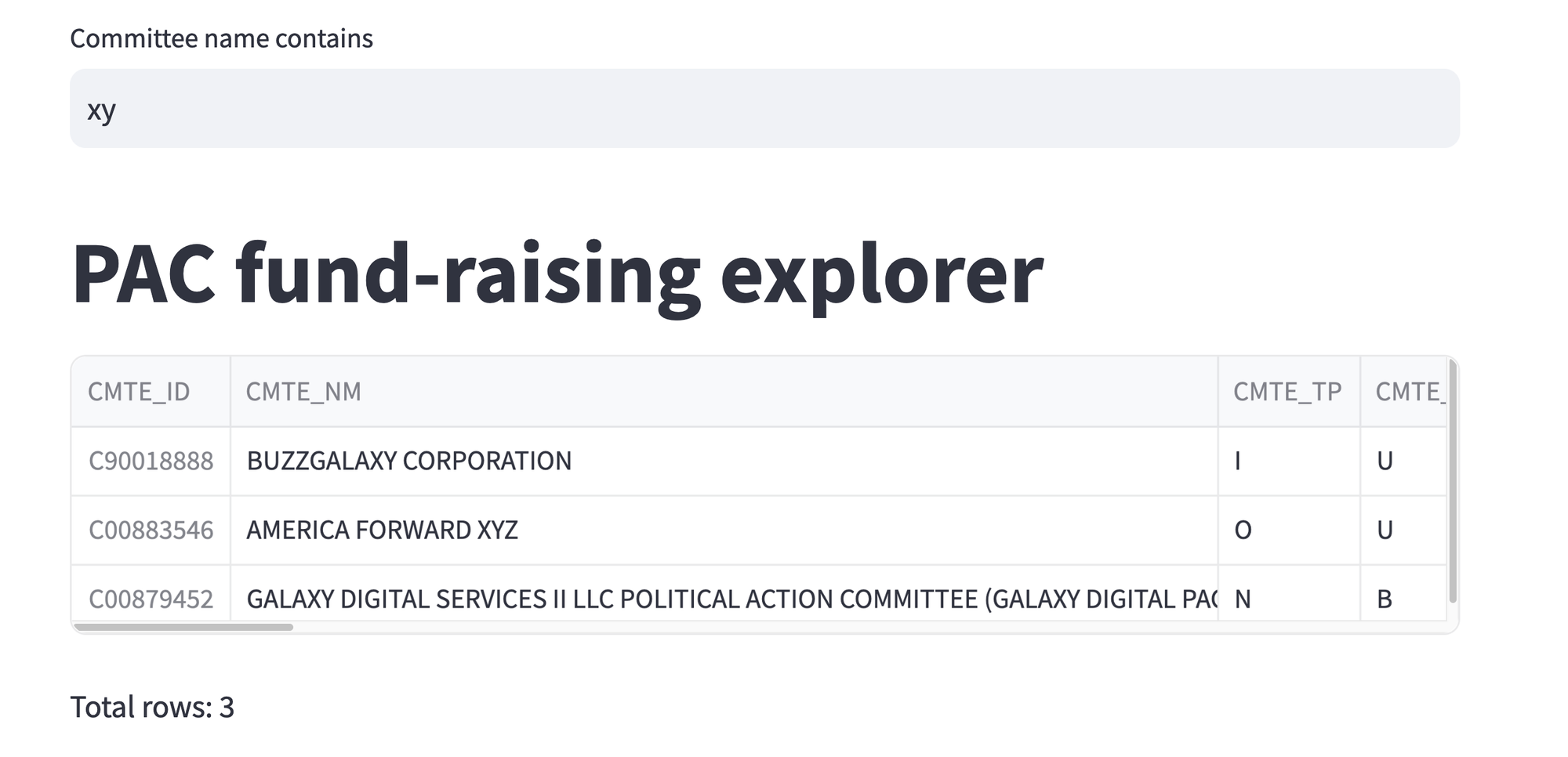
In this example, I entered xy into the text field, That gave us back only three rows, which are both displayed and counted. Every time we change the text in the input field and press ENTER, we get a new subset of the PACs and parties.
Add two slider widgets to the dashboard app, one for the minimum amount raised and another for the maximum amount raised, in thousands of dollars. min_raised slider should start at 0, and the max_raised slider should start at its max value. Only show those rows whose TTL_RECEIPTS column is between those numbers. If the user makes min_raised greater than max_raised, then swap their values.
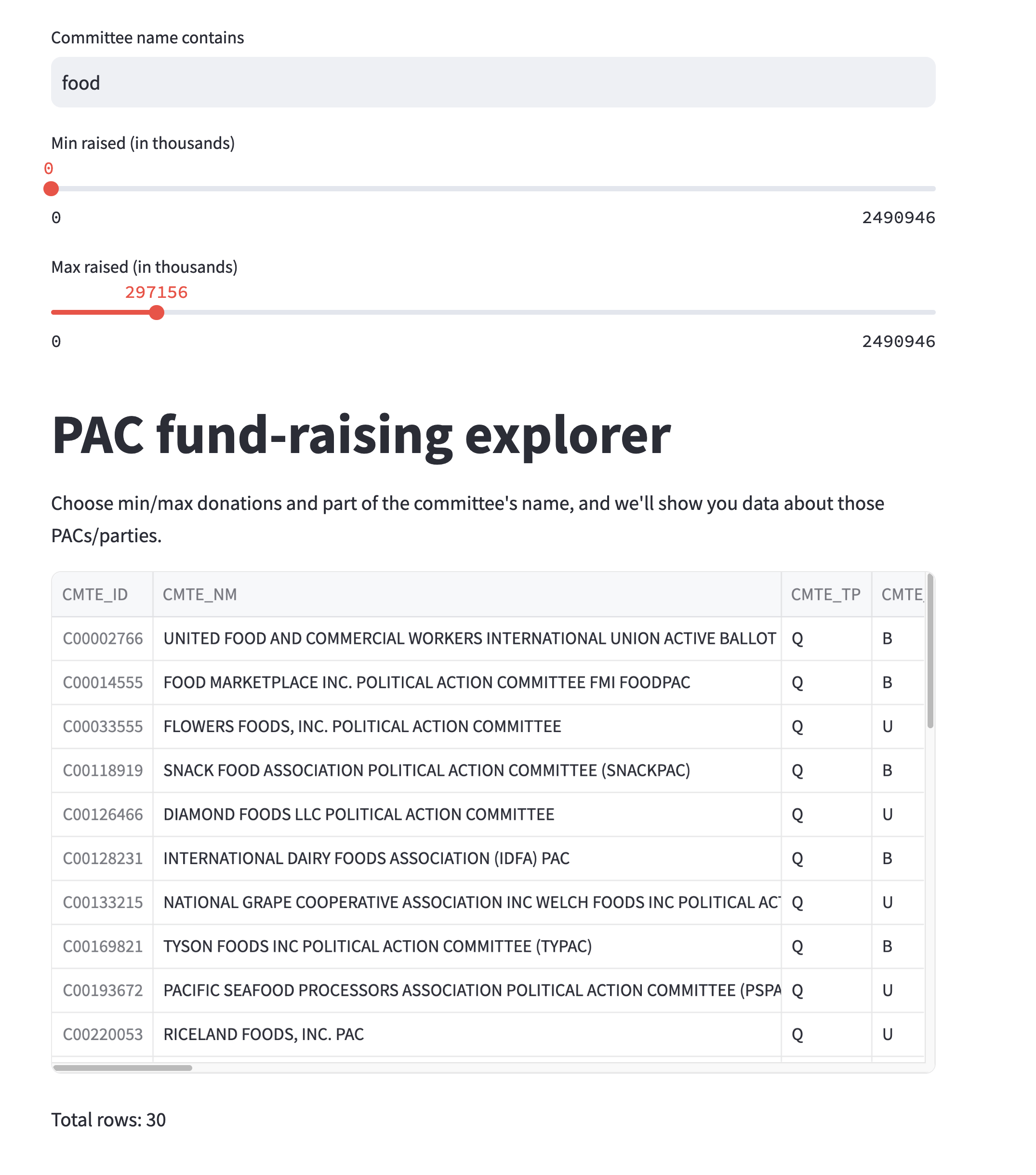
Streamlit also supports sliders, letting users choose numeric values from a range. I asked you to create to sliders, min_raised and max_raised, such that we can find those parties and PACs that have raised between a certain amount.
First, we have to find out the maximum amount that has been raised. That'll allow us to set the max_raised slider's maximum value correctly. I did this by invoking max on df['TTL_RECEIPTS']. I then divided this by 1,000, so that the numbers would be a bit more manageable, and turned it into an integer:
max_raised_value = int(df['TTL_RECEIPTS'].max() / 1000)With this defined, I then invoked st.slider twice, to create two sliders:
min_raised = st.slider('Min raised (in thousands)',
                       min_value=0,
                       max_value=max_raised_value)

max_raised = st.slider('Max raised (in thousands)',
                       min_value=0,
                       max_value=max_raised_value,
                       value=max_raised_value)
Notice that each slider has a label (the first argument), a minimum value (0 in both), a maximum value (set to max_raised_value), and in the case of max_raised, a starting value (max_raised_value).
The only potential problem is that the user will allow min_raised to be greater than max_raised. It might be weird, but we need to protect ourselves from that. We can do that by checking if this has happened, and then swapping them:
if min_raised > max_raised:
    min_raised, max_raised = max_raised, min_raised
We can now update our query for filtered_df, adding two new calls to .loc, checking that TTL_RECEIPTS is greater than min_raised and less than max_raised:
filtered_df = (
    df
    .loc[lambda df_: df_['TTL_RECEIPTS'] >= min_raised * 1000]
    .loc[lambda df_: df_['TTL_RECEIPTS'] <= max_raised * 1000]
    .loc[lambda df_:
        df_['CMTE_NM'].str.contains(committee_name_contains.upper())]
    )
Notice that we're just adding new conditions to our existing query, mirroring the UI widgets we're adding on the screen.
I added some instructions using Markdown, thanks to st.markdown:
st.markdown('''Choose min/max donations and part of the committee's name, and we'll show you data about those PACs/parties.''')
My total code is thus:
import streamlit as st
import pandas as pd

filename = '/Users/reuven/Downloads/webk24.txt'

df = pd.read_csv(filename, sep='|',
                 header=None,
                 names= ['CMTE_ID',
                         'CMTE_NM', 'CMTE_TP', 'CMTE_DSGN',
                         'CMTE_FILING_FREQ', 'TTL_RECEIPTS', 'TRANS_FROM_AFF',
                         'INDV_CONTRIB', 'OTHER_POL_CMTE_CONTRIB',
                         'CAND_CONTRIB', 'CAND_LOANS', 'TTL_LOANS_RECEIVED',
                         'TTL_DISB', 'TRANF_TO_AFF', 'INDV_REFUNDS',
                         'OTHER_POL_CMTE_REFUNDS', 'CAND_LOAN_REPAY',
                         'LOAN_REPAY', 'COH_BOP', 'COH_COP', 'DEBTS_OWED_BY',
                         'NONFED_TRANS_RECEIVED', 'CONTRIB_TO_OTHER_CMTE',
                         'IND_EXP', 'PTY_COORD_EXP', 'NONFED_SHARE_EXP',
                         'CVG_END_DT'],
                 index_col='CMTE_ID')

# Committee name contains
committee_name_contains = st.text_input(
    'Committee name contains')

# Min/max raised
max_raised_value = int(df['TTL_RECEIPTS'].max() / 1000)
min_raised = st.slider('Min raised (in thousands)',
                       min_value=0,
                       max_value=max_raised_value)
max_raised = st.slider('Max raised (in thousands)',
                       min_value=0,
                       max_value=max_raised_value,
                       value=max_raised_value)

if min_raised > max_raised:
    min_raised, max_raised = max_raised, min_raised

filtered_df = (
    df
    .loc[lambda df_: df_['TTL_RECEIPTS'] >= min_raised * 1000]
    .loc[lambda df_: df_['TTL_RECEIPTS'] <= max_raised * 1000]
    .loc[lambda df_:
         df_['CMTE_NM'].str.contains(committee_name_contains.upper())]
    )


st.title('PAC fund-raising explorer')
st.markdown('''Choose min/max donations and part of the committee's name, and we'll show you data about those PACs/parties.''')
st.dataframe(filtered_df)
st.write(f'Total rows: {len(filtered_df.index)}')
Here's how it looked in my browser:
Now make it possible for people to choose which of the data frame's columns are displayed, using a "multiselect" widget. By default, the CMTE_NM and TTL_RECEIPTS should be displayed, but the user can choose to add whichever they want. If the columns include TTL_RECEIPTS, then show the total of that column.
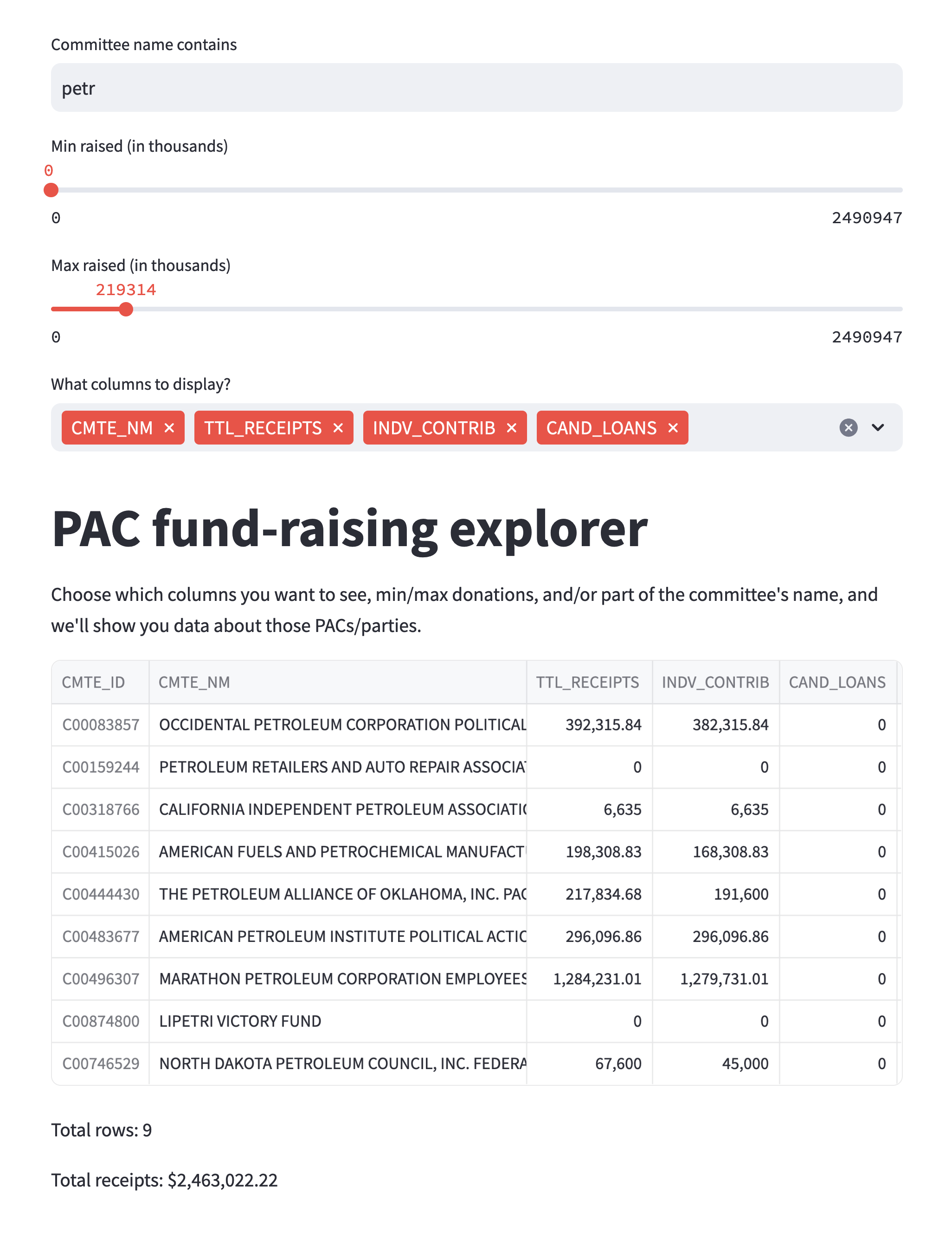
Next, I asked you to use a "multiselect" widget in Streamlit, allowing users to indicate which columns they want to see. By default, they should see the name and total receipts, but users can opt out of those.
We can invoke st.multiselect to indicate which values the user can choose. Here, I pass a string of instructions, then df.columns, since I want to let the user choose from the column names. I then pass a third argument, a list of two strings, the columns that will initially be selected:
columns_to_show = st.multiselect(
    'What columns to display?',
    df.columns,
    ['CMTE_NM', 'TTL_RECEIPTS'])
The result of st.multiselect is a list of strings. In this case, that means a list of column names. We can use [] to filter those column names in our query:
filtered_df = (
    df
    .loc[lambda df_: df_['TTL_RECEIPTS'] >= min_raised * 1000]
    .loc[lambda df_: df_['TTL_RECEIPTS'] <= max_raised * 1000]
    .loc[lambda df_:
         df_['CMTE_NM'].str.contains(committee_name_contains.upper())]
    [columns_to_show]
)
However, I asked you to do one more thing: If TTL_RECEIPTS is selected, then we should show the total amount donated to the shown groups. Here, I used an if statement, followed by a call to st.write. Inside of the f-string, I calculated the sum of TTL_RECEIPTS, formatting it with commas between the elements:
if 'TTL_RECEIPTS' in filtered_df.columns:
    st.write(f'Total receipts: ${filtered_df['TTL_RECEIPTS'].sum():,}')
My total code is:
import streamlit as st
import pandas as pd

filename = '/Users/reuven/Downloads/webk24.txt'

df = pd.read_csv(filename, sep='|',
                 header=None,
                 names= ['CMTE_ID',
                         'CMTE_NM', 'CMTE_TP', 'CMTE_DSGN',
                         'CMTE_FILING_FREQ', 'TTL_RECEIPTS', 'TRANS_FROM_AFF',
                         'INDV_CONTRIB', 'OTHER_POL_CMTE_CONTRIB',
                         'CAND_CONTRIB', 'CAND_LOANS', 'TTL_LOANS_RECEIVED',
                         'TTL_DISB', 'TRANF_TO_AFF', 'INDV_REFUNDS',
                         'OTHER_POL_CMTE_REFUNDS', 'CAND_LOAN_REPAY',
                         'LOAN_REPAY', 'COH_BOP', 'COH_COP', 'DEBTS_OWED_BY',
                         'NONFED_TRANS_RECEIVED', 'CONTRIB_TO_OTHER_CMTE',
                         'IND_EXP', 'PTY_COORD_EXP', 'NONFED_SHARE_EXP',
                         'CVG_END_DT'],
                 index_col='CMTE_ID')

# Committee name contains
committee_name_contains = st.text_input(
    'Committee name contains')

# Min/max raised
max_raised_value = int(df['TTL_RECEIPTS'].max() / 1000) + 1
min_raised = st.slider('Min raised (in thousands)',
                       min_value=0,
                       max_value=max_raised_value)
max_raised = st.slider('Max raised (in thousands)',
                       min_value=0,
                       max_value=max_raised_value,
                       value=max_raised_value)

if min_raised > max_raised:
    min_raised, max_raised = max_raised, min_raised

# Choose columns
columns_to_show = st.multiselect(
    'What columns to display?',
    df.columns,
    ['CMTE_NM', 'TTL_RECEIPTS'])

filtered_df = (
    df
    .loc[lambda df_: df_['TTL_RECEIPTS'] >= min_raised * 1000]
    .loc[lambda df_: df_['TTL_RECEIPTS'] <= max_raised * 1000]
    .loc[lambda df_:
         df_['CMTE_NM'].str.contains(committee_name_contains.upper())]
    [columns_to_show]
)

st.title('PAC fund-raising explorer')
st.markdown('''Choose which columns you want to see, min/max donations, and/or part of the committee's name, and we'll show you data about those PACs/parties.''')
st.dataframe(filtered_df)
st.write(f'Total rows: {len(filtered_df.index):,}')

if 'TTL_RECEIPTS' in filtered_df.columns:
    st.write(f'Total receipts: ${filtered_df['TTL_RECEIPTS'].sum():,}')
And here's how it looks on my computer:
Add another "multiselect" widget, allowing us to choose only certain types of organizations, based on the CMTE_DSGN (i.e., committee designation) column. By default, we should show B, lobbyists/registrants. The total list of possibilities is documented at https://www.fec.gov/campaign-finance-data/committee-master-file-description/, and is:
- B = Lobbyist/Registrant PAC
- D = Leadership PAC
- J = Joint fundraiser
- P = Principal campaign committee of a candidate
- U = Unauthorized
Finally, I asked you to use another "multiselect" widget, this time letting people choose from the various designations in CMTE_DSGN. I goofed in my original statement of the problem; I was looking at the wrong data dictionary, which included an "A" for candidates. I'll make the default "B" here.
Once again, I used st.multiselect to create a widget. The potential values were taken from invoking drop_duplicates on df['CMTE_DSGN'], and the default was set to be ['B']:
designations_to_show = st.multiselect(
    'What designations to display?',
    df['CMTE_DSGN'].drop_duplicates(), ['B'])
I then updated my query to keep only rows in which CMTE_DSGN was one of the values in designations_to_show, the list of strings returned by the widget:
filtered_df = (
    df
    .loc[lambda df_: df_['CMTE_DSGN'].isin(designations_to_show)]
    .loc[lambda df_: df_['TTL_RECEIPTS'] >= min_raised * 1000]
    .loc[lambda df_: df_['TTL_RECEIPTS'] <= max_raised * 1000]
    .loc[lambda df_:
         df_['CMTE_NM'].str.contains(committee_name_contains.upper())]
    [columns_to_show]
    )
Everything else remained the same. And thus, my final code is:
import streamlit as st
import pandas as pd

filename = '/Users/reuven/Downloads/webk24.txt'

df = pd.read_csv(filename, sep='|',
                 header=None,
                 names= ['CMTE_ID',
                         'CMTE_NM', 'CMTE_TP', 'CMTE_DSGN',
                         'CMTE_FILING_FREQ', 'TTL_RECEIPTS', 'TRANS_FROM_AFF',
                         'INDV_CONTRIB', 'OTHER_POL_CMTE_CONTRIB',
                         'CAND_CONTRIB', 'CAND_LOANS', 'TTL_LOANS_RECEIVED',
                         'TTL_DISB', 'TRANF_TO_AFF', 'INDV_REFUNDS',
                         'OTHER_POL_CMTE_REFUNDS', 'CAND_LOAN_REPAY',
                         'LOAN_REPAY', 'COH_BOP', 'COH_COP', 'DEBTS_OWED_BY',
                         'NONFED_TRANS_RECEIVED', 'CONTRIB_TO_OTHER_CMTE',
                         'IND_EXP', 'PTY_COORD_EXP', 'NONFED_SHARE_EXP',
                         'CVG_END_DT'],
                 index_col='CMTE_ID')

# Committee name contains
committee_name_contains = st.text_input(
    'Committee name contains')

# Min/max raised
max_raised_value = int(df['TTL_RECEIPTS'].max() / 1000) + 1
min_raised = st.slider('Min raised (in thousands)',
                       min_value=0,
                       max_value=max_raised_value)
max_raised = st.slider('Max raised (in thousands)',
                       min_value=0,
                       max_value=max_raised_value,
                       value=max_raised_value)

if min_raised > max_raised:
    min_raised, max_raised = max_raised, min_raised

# Choose columns
columns_to_show = st.multiselect(
    'What columns to display?',
    df.columns,
    ['CMTE_NM', 'TTL_RECEIPTS'])

# Choose committee designations
designations_to_show = st.multiselect(
    'What designations to display?',
    df['CMTE_DSGN'].drop_duplicates(), ['B'])

filtered_df = (
    df
    .loc[lambda df_: df_['CMTE_DSGN'].isin(designations_to_show)]
    .loc[lambda df_: df_['TTL_RECEIPTS'] >= min_raised * 1000]
    .loc[lambda df_: df_['TTL_RECEIPTS'] <= max_raised * 1000]
    .loc[lambda df_:
         df_['CMTE_NM'].str.contains(committee_name_contains.upper())]
    [columns_to_show]
    )

st.title('PAC fund-raising explorer')
st.markdown('''Choose which columns you want to see, min/max donations, and/or part of the committee's name, and we'll show you data about those PACs/parties.''')
st.dataframe(filtered_df)
st.write(f'Total rows: {len(filtered_df.index):,}')

if 'TTL_RECEIPTS' in filtered_df.columns:
    st.write(f'Total receipts: ${filtered_df['TTL_RECEIPTS'].sum():,.2f}')
And it looks like this:
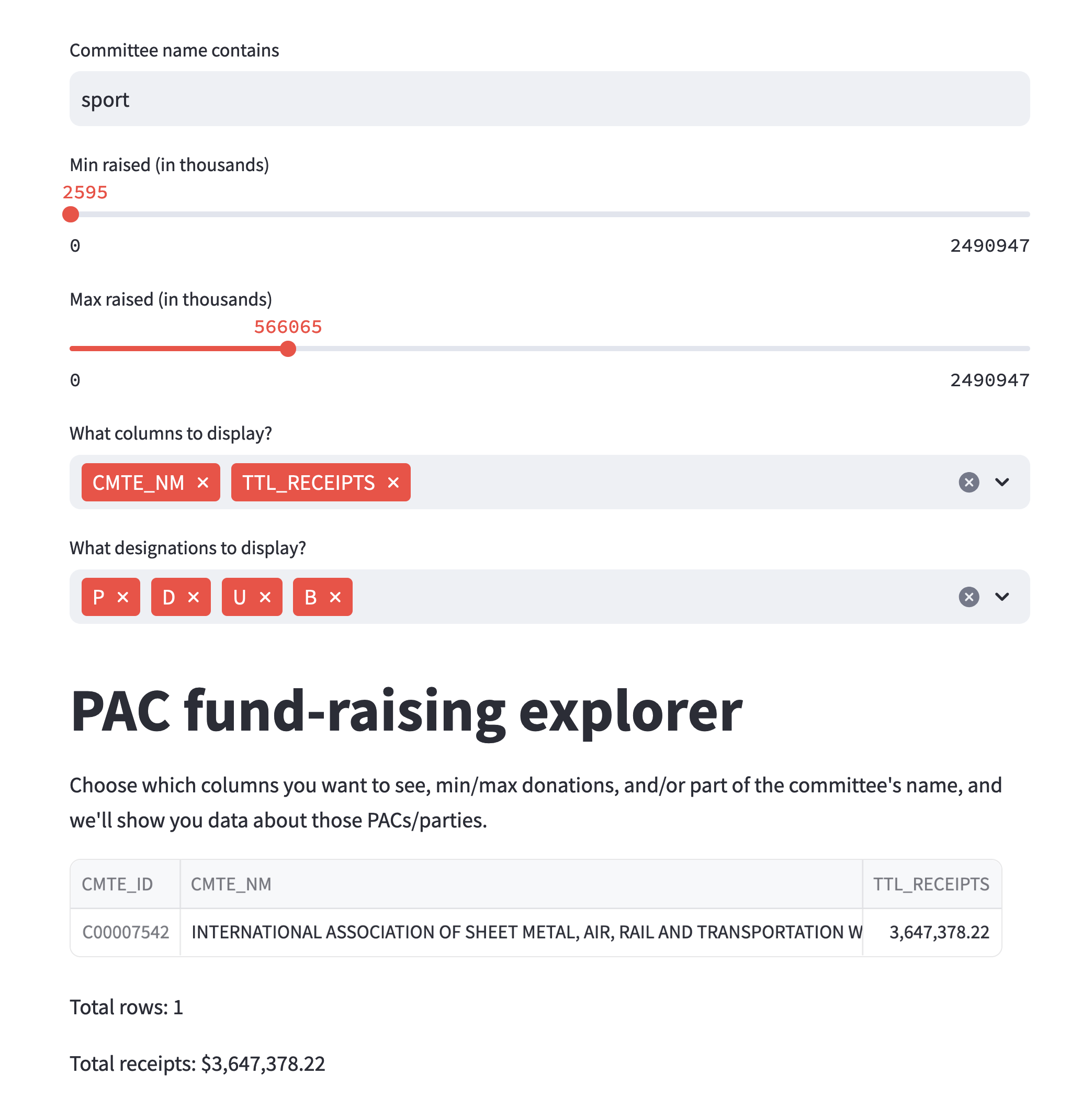
And there we have it, a dashboard that lets us explore PAC and similar political donations. Streamlit does much more than this, and even lets us create graphs, nicely laid out pages with columns and text, and far more. But I hope that this whets your appetite for using it more. I promise that future editions of Bamboo Weekly will also include Streamlit, which has really impressed me.
Here is a link to the zipfile containing this week's Jupyter notebook and Streamlit apps: https://drive.google.com/file/d/1jE226kbGnPcDvJ_yRV9Au0XRNz97jhMR/view?usp=sharing
What do you think about Streamlit? About data dashboards? About the integration with Pandas?
I'll be back next Wednesday with more Pandas challenges based on current events.
Reuven