The 10th cohort of my Python, Data, and AI bootcamp (PythonDAB) starts on November 5th. If you want to get fluent with these technologies in a small, collaborative cohort that emphasizes discussion, interaction, and hands-on practice, then this might be the program for you. Get more information at https://lernerpython.com/bootcamp/ or join the (second) free info session I'm running on Tuesday, registering here: https://us02web.zoom.us/webinar/register/WN_-DTwqi_uRx20iHgaH25jFg
This week, we looked at the International Monetary Fund's latest World Economic Outlook, which came out earlier this month. It says the world economy is currently experiencing contradictory forces:
- On the one hand, geopolitics (including the wars in Ukraine and the Middle East) are making the world economy more fragile.
- On the other hand, unemployment remains relatively low, and economies are doing well enough that interest rates have remained high, to tamp down any potential inflation. They also point to the huge investment in artificial intelligence as helping economies.
In other words, things are interesting. And complicated. And messy.
Fortunately, we have data to help make things a bit easier to understand, and to compare countries and regions around the world.
Data and five questions
The data comes from the IMF's World Economic Outlook, whose main page is at https://data.imf.org/datasets/WEO. You can download a PDF report, but we'll be looking at an Excel file with the full data. You can download it from
Paid subscribers, both to Bamboo Weekly and to my LernerPython+data membership program (https://LernerPython.com) get all of the questions and answers, as well as downloadable data files, downloadable versions of my notebooks, one-click access to my notebooks, and invitations to monthly office hours.
Learning goals for this week include: Working with Excel files, plotting with Plotly, Marimo widgets, window functions, and sorting.
Here are the solutions and explanations for this week's five questions:
Read the "Countries" sheet from the Excel file into a Pandas data frame. Then, looking at GDP per capita in US dollars with current prices in 2026 (NGDPDPC): What are the mean and median values across all countries, and what does that tell us? Create a boxplot with all of the per-capita GDP levels; what does that show? What 10 countries have the highest/lowest per-capita GDP? Which have grown the most in the last 25 years (for countries with values from 25 years ago)?
For starters, I loaded Pandas and Plotly:
import pandas as pd
from plotly import express as px
Next, I loaded the Excel file into a data frame, using read_excel. Fortunately, the sheet of interest to me ("Countries") was in good shape. The only tricky thing was to specify that sheet:
filename = 'data/bw-193-WEOOct2026all.xlsx'

df = (
    pd
    .read_excel(filename, sheet_name='Countries')
)
This resulted in a data frame with 8,668 rows and 81 columns.
Next, we wanted to calculate the mean and median per-capita GDP in 2026 for each country.
I started by using set_index to put the COUNTRY column (i.e., the name of each country) into the data frame's index.
Then I used .loc and pd.col to find only those rows in which INDICATOR.ID is NGDPDPC (and not, as I mistakenly indicated in the questions, NGDPD). I used the two-argument version of loc to retrieve not only specific rows, but also specific columns – in this case, the column named 2026.
This turned out to be a bit trickier than I expected, in part because of Marimo's complaints: Basically, Pandas allows you to have columns with integer names. However, Marimo complains about it, and it's probably right to do that, even if it's annoying.
So instead of retrieving a single column (i.e., a series), I put the column name in [], thus giving me a one-column data frame. I was thus able to invoke set_axis to change the name to a string.
Finally, I used agg to invoke two aggregation methods, mean and median, on the per-capita GDP numbers for all countries, and invoked round to keep the numbers easy to read:
(
    df
    .set_index('COUNTRY')
    .loc[ pd.col('INDICATOR.ID') == 'NGDPDPC', [2026]]
    .set_axis(['2026'], axis='columns')
    .agg(['mean', 'median'])
    .round(2)
)
The result:
	2026
mean	22846.93
median	9496.7
In other words, the mean per-capita GDP is about $23,000. But the median is about $9,500.
That they are so different is a classic example of the difference between mean and median: The mean changes when you have a few values that are either very large or very small. In this case, there are a few countries with very large numbers, and they pull up the mean. The median reflects the halfway point between countries – which is, as we see, significantly lower.
Next, I wanted a boxplot (sometimes known as a "box-and-whiskers" plot), to understand the spread of the numbers. I used pipe to pass the data frame to px.box, Plotly's box-plotting function:
(
    df
    .set_index('COUNTRY')
    .loc[ pd.col('INDICATOR.ID') == 'NGDPDPC', [2026]]
    .set_axis(['2026'], axis='columns')
    .pipe(px.box)
)
The result:
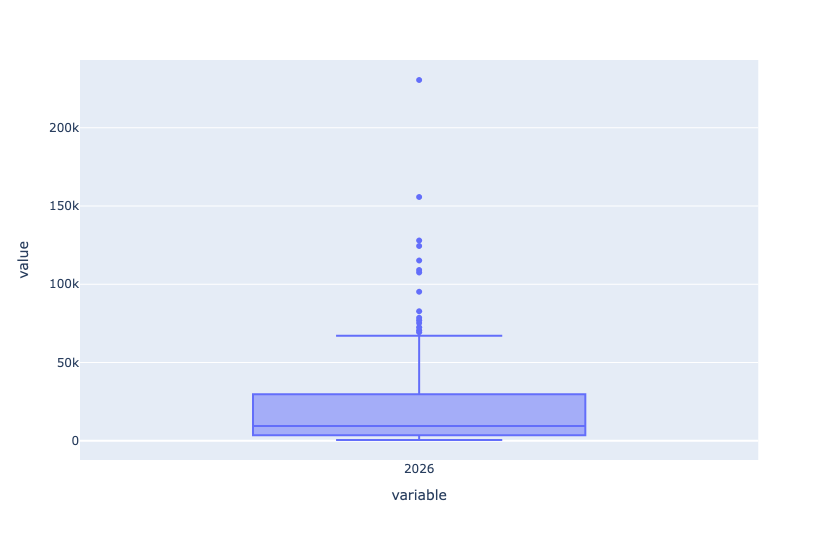
Notice the horizontal line in the middle of the box? That's the median. By definition, half of the countries in the world have a per-capita GDP below that line, and half have one that's above. We can also see the "max" line at about $75,000/year. But in this case, it's not really the maximum, because there are so many high-level outliers (i.e., rich countries).
Remember that these numbers represent the entire country. A wealthy country will often have very poor people, and even the poorest countries have very wealthy people.
If you prefer, you can see these numbers in tabular format with describe:
(
    df
    .set_index('COUNTRY')
    .loc[ pd.col('INDICATOR.ID') == 'NGDPDPC', [2026]]
    .set_axis(['2026'], axis='columns')
    .describe()
    .round(2)
)
The result:
	2026
count	191.0
mean	22846.93
std	31671.78
min	510.37
25%	3575.56
50%	9496.7
75%	29636.88
max	230417.11
Next, I asked which countries have the 10 highest and lowest per-capita GDP. I answered this by invoking both nlargest and nsmallest. Since I wanted both of them, I invoked them indirectly, via agg. However, by default, both methods return only five countries. By passing n=5 as a keyword argument to agg, both methods got their argument, and were thus able to return 10 rows:
(
    df
    .set_index('COUNTRY')
    .loc[ pd.col('INDICATOR.ID') == 'NGDPDPC', [2026]]
    .set_axis(['2026'], axis='columns')
    ['2026']
    .round(2)
    .agg(['nlargest', 'nsmallest'], n=10)
)
The result:
COUNTRY	nlargest	nsmallest
Liechtenstein, Principality of	230417.11
Luxembourg	155732.85
Ireland	127837.36
Switzerland	124478.24
Norway	115188.42
Singapore	109116.83
Iceland	107464.45
United States	95212.14
Denmark	82713.54
Netherlands, The	78535.01
Burundi		510.37
Yemen, Republic of		566.84
Sudan		596.6
South Sudan, Republic of		641.95
Madagascar, Republic of		649.01
Mozambique, Republic of		672.6
Malawi		739.76
Niger		773.66
Somalia		849.89
Central African Republic		891.17
Finally, which countries have shown the greatest growth in per-capita GDP in the last 25 years? To find that, I retrieved the data from both 2001 and 2026, and then used diff to subtract one from the other. I then used nlargest to find the 10 biggest winners:
(
    df
    .set_index('COUNTRY')
    .loc[ pd.col('INDICATOR.ID') == 'NGDPDPC', [2021, 2026]]
    .set_axis(['2021', '2026'], axis='columns')
    .diff(axis='columns')
    ['2026']
    .round(2)
    .nlargest(10)
)
The result:
COUNTRY	2026
Iceland	34243.65
Macao Special Administrative Region, People's Republic of China	32210.38
Guyana	29371.0
Liechtenstein, Principality of	29119.57
Singapore	28231.99
Switzerland	27578.62
Ireland	24207.21
United States	23785.64
Israel	20549.03
Luxembourg	19542.36
Some of these were very much expected, such as Iceland, Singapore, Ireland, and Israel. I was surprised that some of them, such as Singapore, Switzerland, the United States, and Luxembourg, had grown so much. And I definitely didn't expect Macao or Guyana, but here we are.
Create a choropleth map, showing the GDP per capita in US dollars. In Marimo, let the user move a slider to change which year's data will be displayed.
The first step in solving this problem was to create a slider using Marimo's UI widgets. I did that with mo.ui.slider, passing it values for when to start (2000), when to stop (2026), the step size (1), and whether to show the current value (True). I then made sure to let year_slider be displayed to the user in the notebook:
year_slider = mo.ui.slider(start=2000, stop=2026, step=1, show_value=True)
year_slider
With this in place, I put together my map:
- I invoked
px.choropleth, indicating that I wanted a map of the world and to use theCOUNTRYcolumn as the country names - Of course, the
COUNTRYcolumn had previously been the index, so I had to invokereset_indexbefore the call topx.choroplethfor that to work. - Both the
colorandtitlekeyword arguments usedyear_slider.value, where thevalueattribute retrieves the value from a UI element.
The code:
(
    df
    .set_index('COUNTRY')
    .loc[ pd.col('INDICATOR.ID') == 'NGDPDPC', year_slider.value]
    .round(2)
    .reset_index()
    .pipe(px.choropleth, scope='world', locations='COUNTRY', locationmode='country names', color=year_slider.value, title=f'Per-capita GDP in {year_slider.value}')
)
Sample output:
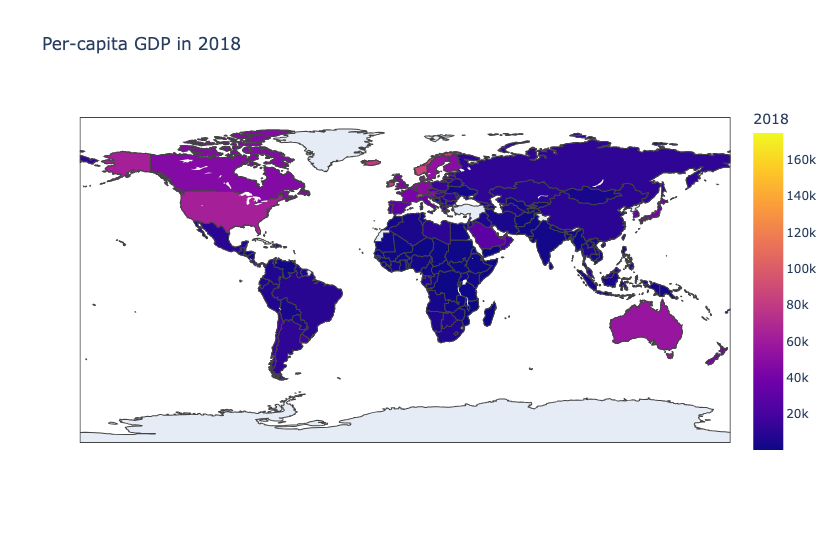
The extremely large number of blue countries — and the very tiny number of lighter-colored countries — demonstrates just how poor so much of the world is, at least when put on a scale with rich countries.
But what if we just want to stack-rank them by per-capita GDP? We can do that with the rank method applied in the middle of our method chain:
(
    df
    .set_index('COUNTRY')
    .loc[ pd.col('INDICATOR.ID') == 'NGDPDPC', year_slider.value]
    .round(2)
    .rank()
    .reset_index()
    .pipe(px.choropleth, scope='world', locations='COUNTRY', locationmode='country names', color=year_slider.value, title=f'Per-capita GDP in {year_slider.value}')
)
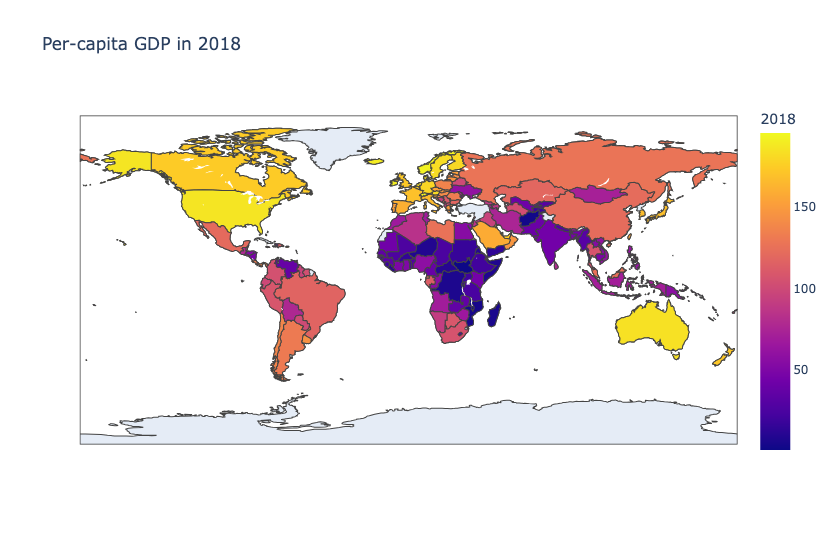
The result is now a bit different: